TD Commercial Banking Phishing Scam Overview
A new phishing campaign is being run by the malware authors; in which they send the phishing Emails to the Users.
Most of the times, malware authors try to register the domains that would look similar to the legitimate domains so that the victim trusts receiver’s Email & victim Opens or Downloads the Email attachment without any thought.
This time bad actors target the TD Commercial Banking by registering tdsecuredocuments.com domain and design an E-mail in such a way that it gains the victim’s trust.
This E-Mail contains an attachment with the name “AccountDocuments.doc” with a subject line “Important Account Documents”
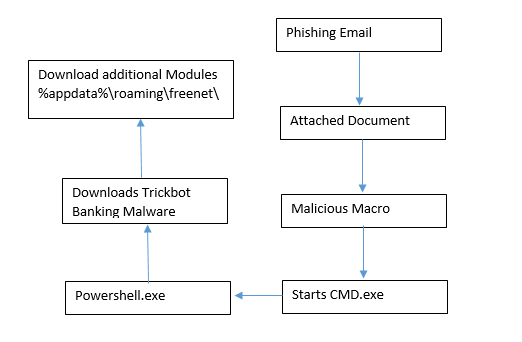
The attached document contains the malicious script that automatically downloads the additional malware (Trickbot Banking Malware) on the victim’s machine without any user’s knowledge.
Trickbot Banking Malware is belonging to the Trojan family. The main purpose of this malware is to gather the Victim’s banking details from the Victim’s machine. This malware is first discovered in the year 2016 after that its new variants are keep coming with new capabilities.
Flow Chart

Get peace of mind! Get rid of malicious programs instantly
Free Checkup & fix for your PC! Get rid of malicious programs instantly!
Technical Analysis of TD Commercial Bank Phishing Scam
File Name: Account Documents.doc
MD5: 58F835AB7D724DE9CBD051F7660E516C
File Type: Doc (Document)
Spread Via: E-mail
Detail Description TD Commercial Bank Phishing Scam with Screenshots
Most of the times malware authors use latest Tactics, Techniques & Procedures (TTP’s) to spread the malware and evade the detection mechanism.
As shown below, Bad actors registered the tdsecuredocuments.com domain so that they can easily fool the victim. They design an Email in such a way that victim’s easily trust an Email without taking any single thought in their mind.
In the subject, body attacker’s used the legitimate Domain Name: tdcommercialbanking.com
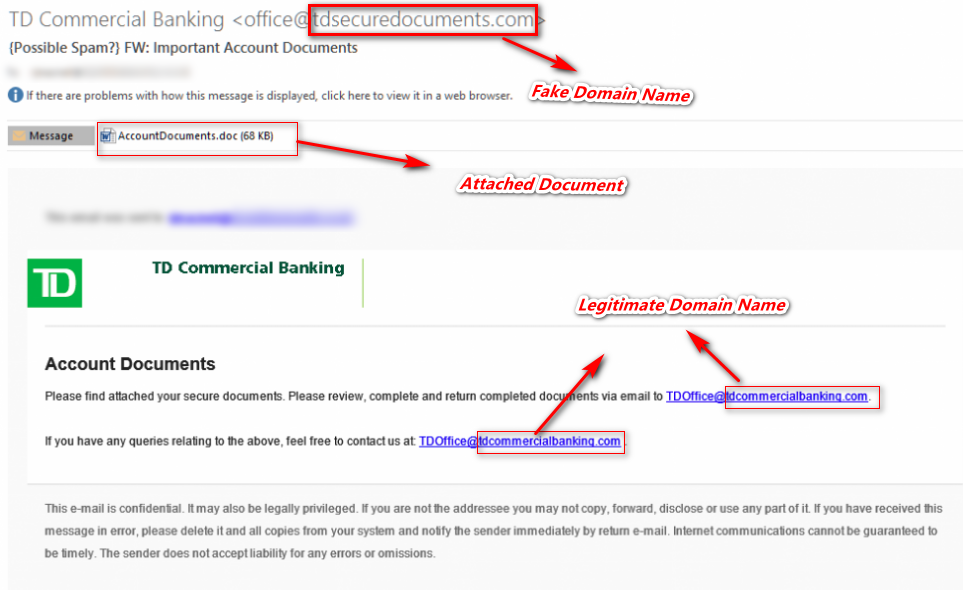
Figure 1 Email Spoofing
As shown above, it contains the attachment with the name of “AccountDocuments.doc”.
As shown below, while opening the attached document “AccountDocuments.doc” it shows the macros disabled security warning and contains the hidden form.
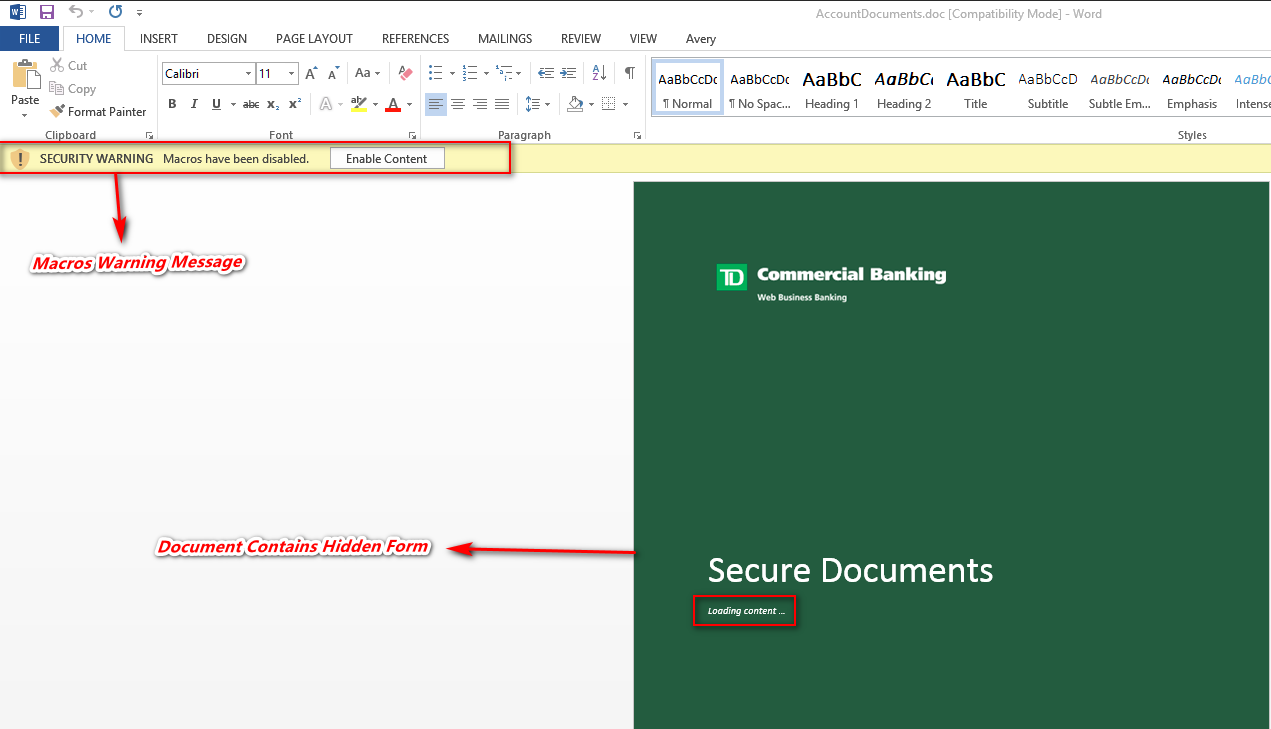
Figure 2 Macros Disabled Warning
In case, if the macros are enabled on the user’s machine then on opening the document malicious script will run in the background without the user’s knowledge.
If the user clicks on the Enable Content button, it’s run the malicious macro code behind. This document contains the AutoOpen () function; which means on opening the document malicious macro code will be executed in the background.
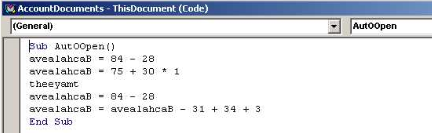
Figure 3 Auto Open Function
As shown below, this document contains the malicious obfuscated code which is not understandable by anyone easily. By doing debugging we can understand the malicious script behavior.
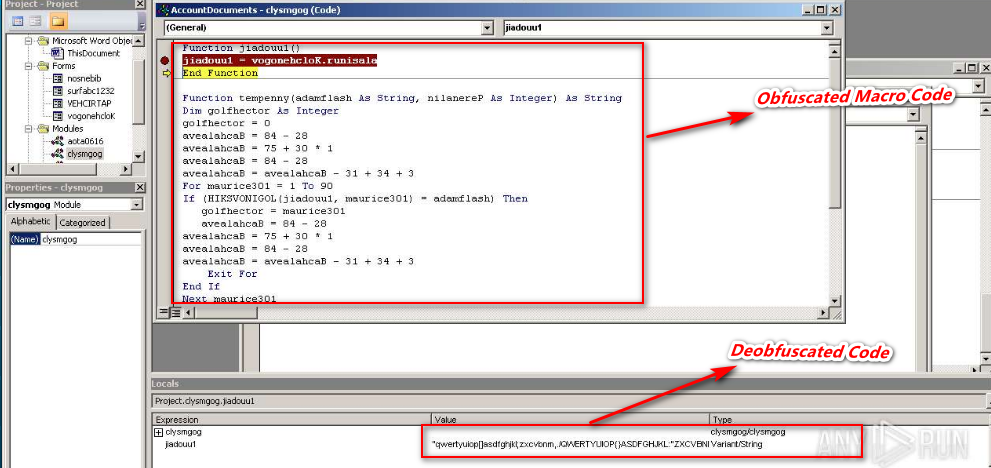
Figure 4 Obfuscated & Deobfuscated Code
During analysis we found that, this malicious code attempts to run the PowerShell code through CMD.exe and also it stores the PowerShell code into bat file (Dioeedubvgyy.bat).

Figure 5 Process Tree
As shown above the malicious PowerShell script attempts to automatically download the malware on victim’s machine in %temp% location.
This malicious script has 2 Download Locations, if in case first URL doesn’t work then it will download the file from the alternate server.
Primary Download URL: hxxp://misionpsicologica[.]com/outurg[.]bin
Alternate Download URL: hxxp://galeona[.]com/outurg[.]bin
Once the file is automatically downloaded on the victim’s machine then it will rename the outurg.bin to czreaf_cr.exe. Thereupon it automatically initiates the czreaf_cr.exe in background without the user’s knowledge.
Once the czreaf_cr.exe (trickbot malware) is executed its automatically download their additional modules in %appdata%\Roaming\freenet
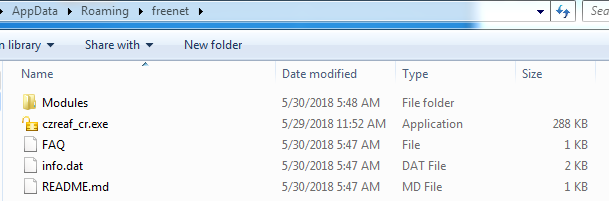
Figure 6 Trickbot Malware Additional Files
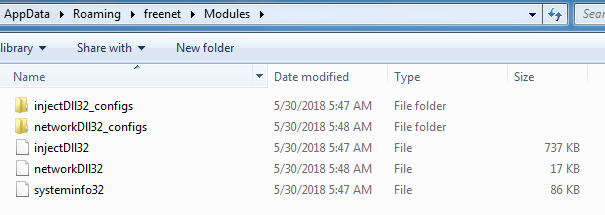
Figure 7 Trickbot Malware Modules
IOC’s
Associated Email ID:
Office@tdsecuredocuments.com
TDoffice@tdcommercialbanking.com
Associated URL’s:
hxxp://galeona[.]com/outurg[.]bin
hxxp://misionpsicologica[.]com/outurg[.]bin
Associated Domain
tdsecuredocuments.com
Associated IP Related with Domain
95.211.158.59
185.10.58.101
109.236.93.190
191.101.26.73
Associated Hash
|
File Name
|
Hash
|
|
AccountDocuments.doc
|
58F835AB7D724DE9CBD051F7660E516C
|
|
czreaf_cr.exe
|
F0370F160BFA8338F386A0BDF4D1B481
|
Associated Folder Path
%appdata%\temp
%appdata%\roaming\freenet
Are you worried about your PC health?
Check your PC Health for Free!
Tips to Prevent virus and malware from Infecting Your System:
- Enable your popup blocker: Pop-ups and ads on the websites are the most adoptable tactic used by cybercriminals or developers with the core intention to spread malicious programs.
So, avoid clicking uncertain sites, software offers, pop-ups etc. and Install a powerful ad- blocker for Chrome, Mozilla, and IE
- Keep your Windows Updated: To avoid such infections, we recommend that you should always keep your system updated through automatic windows update.By doing this you can keep your device free from virus.According to the survey, outdated/older versions of Windows operating system are an easy target.
- Third-party installation: Try to avoid freeware download websites as they usually install bundled of software with any installer or stub file.
- Regular Backup: Regular and periodical backup helps you to keep your data safe in case the system is infected by any kind of virus or any other infection.Thus always backup important files regularly on a cloud drive or an external hard drive.
- Always have an Anti-Virus: Precaution is better than cure. We recommend that you install an antivirus like ITL Total Security or a good Malware Removal Tool like Download Virus RemovalTool